Hugio Font Review
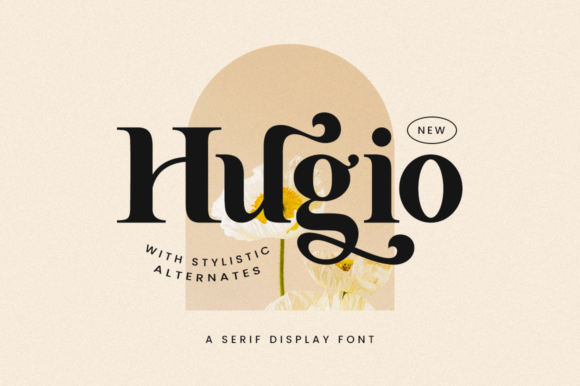
As a web designer, I’m always on the lookout for fonts that bring both visual flair and functional clarity to digital projects. Hugio, a chic and highly detailed serif font, has quickly become one of my go-to choices for headers, hero sections, and brand-centric design elements. Its elegant structure and refined details make it ideal for creating a premium feel without sacrificing readability.
Testing Hugio in a Hero Section
I first tested Hugio on a landing page for a boutique online store. The font’s strong verticals and subtle serifs gave the hero section a classic yet modern look. When paired with a bold sans serif for the body text, it created a balanced contrast that felt both professional and inviting. The PUA encoding made it easy to access all the swashes and alternate glyphs, which added a touch of personality to the headline without overwhelming the design.
Responsive Design and Mobile Usability
One of the first things I checked was how Hugio performed on mobile screens. At smaller sizes, the font retained its legibility, especially when used for short phrases or headings. I noticed that the font’s spacing allowed it to breathe well on tight layouts, making it a solid choice for buttons, call-to-action areas, and navigation labels. However, I would avoid using it for long paragraphs or dense text blocks, as the intricate details could become less readable at very small sizes.
Font Pairing and Visual Hierarchy
When working on a coaching website, I paired Hugio with a clean sans serif for the body copy. The combination created a clear visual hierarchy, with Hugio standing out as a strong display font while the sans serif provided a calm and approachable tone for longer content. This pairing worked particularly well for blog headers, course titles, and promotional banners. I also experimented with using Hugio as a decorative accent in a portfolio site, where it added a sense of sophistication to project titles and taglines.
Accessibility and Readability Considerations
While Hugio is visually striking, it’s important to consider accessibility when using it in digital design. For instance, I wouldn’t recommend it for form labels, navigation menus, or any text that users need to scan quickly. However, when used appropriately—such as for headlines, logos, or key messaging—it can elevate the overall aesthetic of a site. I also found that using it on dark backgrounds or image overlays required some adjustments to ensure sufficient contrast and legibility.
Webfont Availability and Licensing
Before integrating Hugio into a client project, I checked its webfont availability and licensing options. It’s available in multiple weights and includes a range of alternates and ligatures, which is great for customizing typography. The commercial license allows for use across websites, digital templates, and online stores, making it a versatile choice for designers and business owners alike. I also appreciated the ease of accessing all the glyphs through PUA encoding, which simplified the process of adding unique typographic elements to designs.
Real-World Applications
In a recent project for a creative portfolio site, I used Hugio for the main heading and subheadings. The font’s refined style complemented the site’s minimalist layout, giving it a polished and cohesive look. For an online course sales page, I applied Hugio to the headline and CTA buttons, which helped draw attention and create a sense of urgency. In both cases, the font added a level of elegance that aligned with the brand’s identity and visual storytelling.
Final Thoughts on Hugio
Hugio is a standout serif font that brings both beauty and versatility to digital design. Whether you’re building a boutique online store, a coaching website, or a creative portfolio, it offers a refined aesthetic that can enhance your brand’s visual appeal. Its PUA encoding, extensive glyph set, and commercial licensing make it a practical choice for web designers and digital creators. Just remember to use it strategically—pair it with simpler fonts for balance, and avoid it for long text blocks or accessibility-heavy interfaces. With the right application, Hugio can be a powerful tool in your design toolkit.